Posted by antves 1 day ago
Here’s a demo: https://www.youtube.com/watch?v=62jthcU705k Docs start at https://docs.smooth.sh.
Agents like Claude Code, etc are amazing but mostly restrained to the CLI, while a ton of valuable work needs a browser. This is a fundamental limitation to what these agents can do.
So far, attempts to add browsers to these agents (Claude’s built-in --chrome, Playwright MCP, agent-browser, etc.) all have interfaces that are unnatural for browsing. They expose hundreds of tools - e.g. click, type, select, etc - and the action space is too complex. (For an example, see the low-level details listed at https://github.com/vercel-labs/agent-browser). Also, they don’t handle the billion edge cases of the internet like iframes nested in iframes nested in shadow-doms and so on. The internet is super messy! Tools that rely on the accessibility tree, in particular, unfortunately do not work for a lot of websites.
We believe that these tools are at the wrong level of abstraction: they make the agent focus on UI details instead of the task to be accomplished.
Using a giant general-purpose model like Opus to click on buttons and fill out forms ends up being slow and expensive. The context window gets bogged down with details like clicks and keystrokes, and the model has to figure out how to do browser navigation each time. A smaller model in a system specifically designed for browsing can actually do this much better and at a fraction of the cost and latency.
Security matters too - probably more than people realize. When you run an agent on the web, you should treat it like an untrusted actor. It should access the web using a sandboxed machine and have minimal permissions by default. Virtual browsers are the perfect environment for that. There’s a good write up by Paul Kinlan that explains this very well (see https://aifoc.us/the-browser-is-the-sandbox and https://news.ycombinator.com/item?id=46762150). Browsers were built to interact with untrusted software safely. They’re an isolation boundary that already works.
Smooth CLI is a browser designed for agents based on what they’re good at. We expose a higher-level interface to let the agent think in terms of goals and tasks, not low-level details.
For example, instead of this:
  click(x=342, y=128)
  type("search query")
  click(x=401, y=130)
  scroll(down=500)
  click(x=220, y=340)
  ...50 more steps
Search for flights from NYC to LA and find the cheapest option
Smooth enables agents to launch as many browsers and tasks as they want, autonomously, and on-demand. If the agent is carrying out work on someone’s behalf, the agent’s browser presents itself to the web as a device on the user’s network. The need for this feature may diminish over time, but for now it’s a necessary primitive. To support this, Smooth offers a “self” proxy that creates a secure tunnel and routes all browser traffic through your machine’s IP address (https://docs.smooth.sh/features/use-my-ip). This is one of our favorite features because it makes the agent look like it’s running on your machine, while keeping all the benefits of running in the cloud.
We also take away as much security responsibility from the agent as possible. The agent should not be aware of authentication details or be responsible for handling malicious behavior such as prompt injections. While some security responsibility will always remain with the agent, the browser should minimize this burden as much as possible.
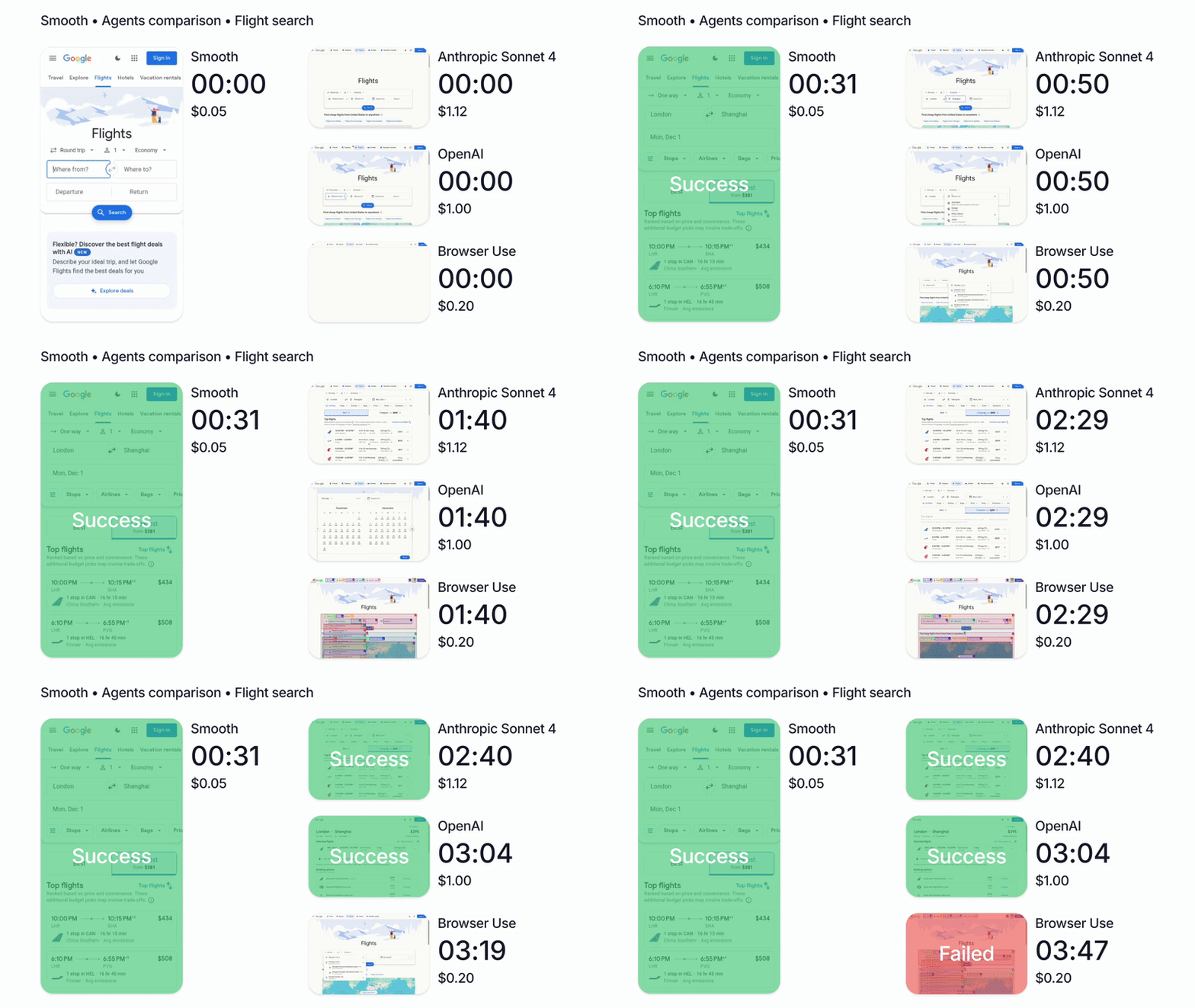
We’re biased of course, but in our tests, running Claude with Smooth CLI has been 20x faster and 5x cheaper than Claude Code with the --chrome flag (https://www.smooth.sh/images/comparison.gif). Happy to explain further how we’ve tested this and to answer any questions about it!
Instructions to install: https://docs.smooth.sh/cli. Plans and pricing: https://docs.smooth.sh/pricing.
It’s free to try, and we'd love to get feedback/ideas if you give it a go :)
We’d love to hear what you think, especially if you’ve tried using browsers with AI agents. Happy to answer questions, dig into tradeoffs, or explain any part of the design and implementation!
you should be able to tell it to go to your localhost address and it should be able to navigate to your local app from the remote browser
let us know if you have any questions!
I _would_ be curious to try it, but...
My first question was whether I could use this for sensitive tasks, given that it's not running on our machines. And after poking around for a while, I didn't find a single mention of security anywhere (as far as I could tell!)
The only thing that I did find was zero data retention, which is mentioned as being 'on request' and only on the Enterprise plan.
I totally understand that you guys need to train and advance your model, but with suggested features like scraping behind login walls, it's a little hard to take seriously with neither of those two things anywhere on the site, so anything you could do to lift up those concerns would be amazing.
Again, you seem to have done some really cool stuff, so I'd love for it to be possible to use!
Update: The homepage says this in a feature box, which is... almost worst than saying nothing, because it doesn't mean anything? -> "Enterprise-grade security; End-to-end encryption, enterprise-grade standards, and zero-trust access controls keep your data protected in transit and at rest."
We take security very seriously and one of the main advantages of using Smooth over running things on your personal device is that your agent gets a browser in a sandboxed machine with no credentials or permissions by default. This means that the agent will be able to see only what you allow it to see. We also have some degree of guard-railing which we will continue to mature over time. For example, you can control which URLs the agent is allowed to view and which are off limits.
Until we'll be able to run everything locally on device, there must be a level of trust in the organizations that control the technology stack, passing from the LLM all the way to the infrastructure providers. And this applies to every personal information you disclose at any touch point to any AI company.
I believe that this trust is something that we and every other company in the space will need to fundamentally continue to grow and mature with our community and our users.
Fun fact, ai can use the same tools you do, we don't have to reinvent everything and slap a "built for ai" label on it
For example, the playwright MCP is very unreliable and inefficient to use. To mention a few issues, it does not correctly pierce through the different frames and does not handle the variety of edge cases that exist on the web. This means that it can't click on the button it needs to click on. Also, because it lacks control over the context design, it cannot optimize for contextual operations and your LLM trace gets polluted with incredible amount of useless tokens. This increases cost, task complexity for the LLM, and latency
On top of that, these tools rely on the accessibility tree, which is just not a viable approach for a huge number of websites
You describe problems I don't have. I'm happy with Playwright and other scraping tools. Certainly not frustrated enough to pay to send my data to a 3rd party
Consider me a late adopter because I care about the security of my data. (and no, whatever you say about security will not change my mind, track record and broader industry penetration may)
Make it self-hostable, the conversation can change
I get the sandboxing, etc, but a Docker container would achieve the same goals.
For example, with remote browsers you get to give your swarm of agents unlimited and always-on browsers that they can use concurrently without being bottlenecked by your device resources
I think we tend to default to thinking in terms of one agent and one browser scenarios because we anthropomorphize them a lot, but really there is no ceiling to how parallel these workflows can become once you unlock autonomous behavior
Offer up the locally hosted option and it’ll be more widely adopted by those who actually want to use it as opposed to tinker.
I know this may not fit into your “product vision”, however.
Seems like an interesting new category.
Agents that start using subagents rather than humans using the subagents directly
We'll continue to make Smooth more affordable and accessible as this is a core principle of our work (https://www.smooth.sh/images/comparison.gif)
If it's "trust me, I did a fair comparison", that's not going to fly today. There's too much lying in society, trusting people trying to sell you something to be telling the truth is not the default anymore, skepticism is