Top
Best
New

Posted by signa11 13 hours ago

Ideas on modernizing the open-source desktop(lwn.net)
290 points | 335 commentspage 5
ferguess_k 2 hours ago|
As long as they don't kill the scollbar, let buttons look like buttons, then I'm fine with that. I mean UX guys need to eat, too, right? So they are trying to make new things every X years. I get that. I'm fine with that. Just don't make things worse, alright?
uxd2 1 hour ago|
They did kill the scrollbar. As system admin I've seen prople openning settings to change settings I told them to change and they'd tell me the option is not there. I come to their computer and the setting is just below the fold, there is just no line (that is supposed to be scrollbar) if cursor is not in the main pane. I understand the intent not to clutter but if most users still want scrollbars, anot not even the naked ones, but the one with arrows at bottom/top. Windows has been designed toward touchsreens that nobody wants to use (and all my devices had touch, and I never once used touch scroll or other interactions)
uxd2 1 hour ago||
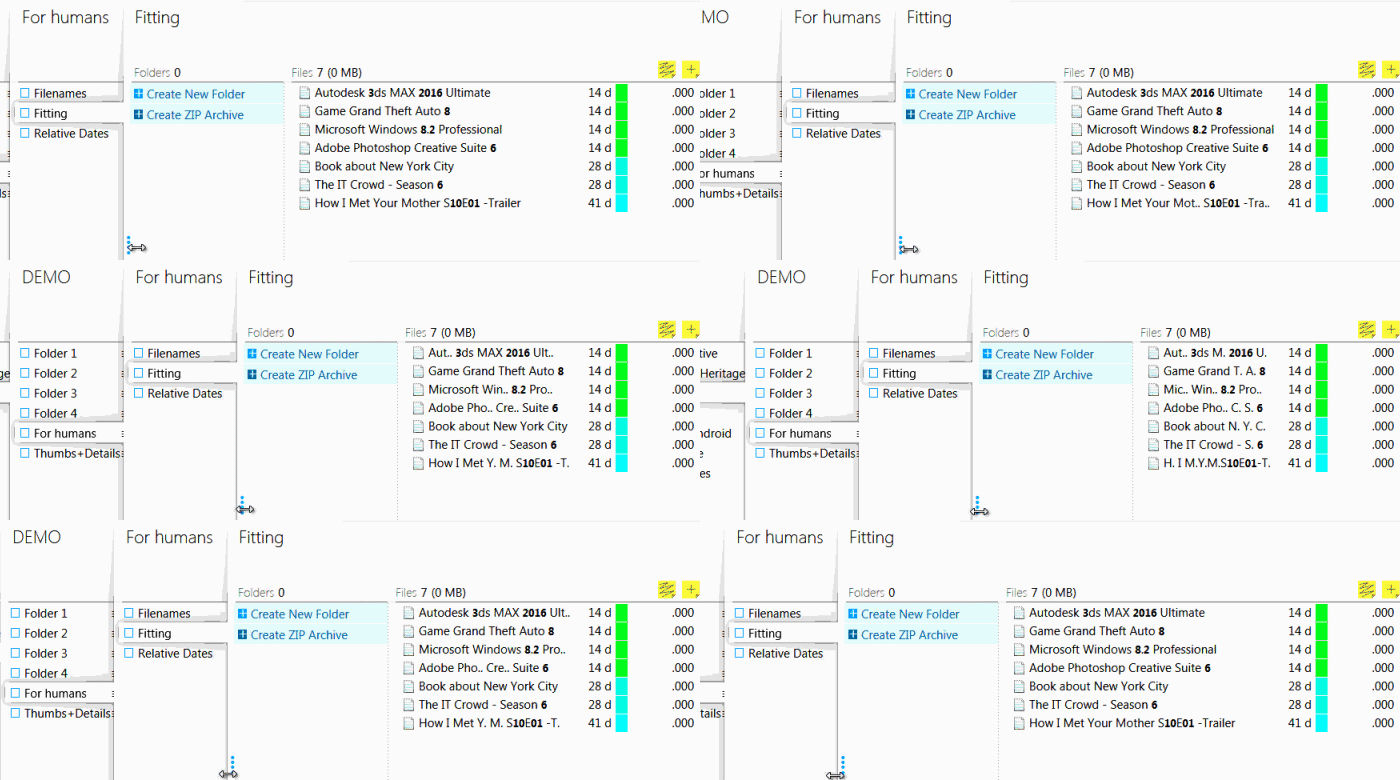
I am surprised that Windows doesn't have the mentioned middle-of-name ellipsis. OneCommander uses it, but not Explorer. BitCommander had even smarter trimming prioritizing numbers and words reducing to letter plus dot http://bit-commander.com/GIF/bit-commander-file-name-shorten...
ardeguire 4 hours ago||
I don't see it linked, but the talk is available on YouTube [1].

Scott is a very good presenter, and he clearly thinks about this stuff a lot. I really liked the demo for moving windows to the sides of the screen, since it's kind of how I use the alt-tab interface -- look at the preview for the window/app I'm looking for then tab to it or click on it. Having a visual overview of all currently open windows could be useful to me. (It might actually get me to close things I'm not currently working on! Although my dozens and dozens of browser tabs tell a different story...)

[1]: https://www.youtube.com/watch?v=V7AfAcQwLW0

Mikhail_Edoshin 7 hours ago||
One thing I remember fondly from Windows 3.1 times was Dashboard by Starfish software. It was meant to replace Program Manager and was indeed a very good replacement. It offered multiple desktops, taskbar, program organization, but it was very customizable, so if you didn't want, say, taskbar, you could turn it off; same for all other parts. It could be made very compact and with a global shortcut to bring it to front it was truly handy. Very much like a car dashboard; you operated it from muscle memory.

https://winworldpc.com/product/dashboard/30

onaclov2000 2 hours ago||
I've been slowly boiling the idea in the back of my head, what if your desktop was just a chat window, and as you said the things you wanted/needed to do, the underlying system would either build and reuse (or install) and pipe all this to some view window, which you can then interact with, but there are (kinda?) no native applications on the machine just....a (preferably local) AI that can handle all this build, install (maybe temporarily but keep all data) the two key things the machine needs is all conversation history and all generated data (by the user) otherwise nothing else. Of course we aren't there yet, but I do think it could be interesting. I personally don't love mobile largely because I feel like it limits so much so that would be my only worry, could this limit things? What about instead of an app store it's a prompt store....(Maybe openclaw already did this,I haven't used it but feel like I heard of this).
rtpg 9 hours ago||
> He talked about the desktop building blocks, basically the familiar WIMP model plus the desktop clipboard, as the way that users move data around. Expert users can move data around quickly, he said, but there's a problem: the desktop is stateless. He called this the curse of direct manipulation; there is no working memory to the desktop. ""If you copy a few too many things to the clipboard, oh sorry, it's gone"". > > Jenson theorized that the reason there are so many desktop environments, window managers, and Wayland compositors for Linux—as well as alternative clipboard managers—is because the desktop isn't quite working right for users. He thought it was really about working memory: ""How do I manage my data in such a way that I can remember it across all of these things and actually use it."" His perspective shifted to asking ""what would we do to working memory to improve the desktop UX?""

I feel this so much.

I think that there's a "better" windowing system where all of your stuff sticks around way more than it used to. Clipboard history, but also just "oh you have these windows open while working on this task".

People have really leaned into coding harnesses + chat windows as a way of grouping together work. I think there's a more general idea in this space. Don't make me explicitly keep track of things, just hold onto it all for me!

There's some universe where my desktop is basically a Notion-like thing, and I can just throw things into semi-persistent workspaces (that I close out when I'm done). Desktop Environments that make this work nicely will be quite cool IMO

(A simple and dumb version of this is the BeOS "group various windows together, even though they aren't from the same application" stuff. Very cool stuff IMO

melvinroest 9 hours ago||
> Clipboard history, but also just "oh you have these windows open while working on this task".

I feel this. When I first got to learn what a workspace was (in Eclipse, of all things), and I really drilled down into the English meaning of it (I'm Dutch), I thought about exactly what you're describing right now.

rtpg 9 hours ago||
Yep.

There's also a thing of wanting "http referer"-style things but at the desktop. I want things that tell me _from where_ I clicked into a page in the browser (like "oh you got here from Slack (at this spot)"

Desktop history, clipboard history... all associated to certain contexts. Would be quite nice IMO

mrob 5 hours ago|||
Stateless desktop is a feature. Application state is something I have to mirror in my head to prevent applications from doing unwanted and surprising things.

IMO, even the clipboard metaphor is too much state. We already have the selection highlight, which has the nice benefit of being directly visible. This should be reduced to a single global selection highlight. Then copy and paste can be replaced by "duplicate highlighted selection here", eliminating the possibility of forgetting what's in the paste buffer.

diegocg 9 hours ago|||
KDE has clipboard history, for the record. Persistent across reboots. I can't understand why it's not more prevalent
Quartzium 9 hours ago||
I think that's clear text somewhere on the disk (I guess SSD these days). Might contain sensitive data, I'm not keen on it.
graemep 6 hours ago||
It removes anything that looks like a password.

Whole drive encryption reduces the risks too.

ToyKeeper 7 hours ago||
> Don't make me explicitly keep track of things, just hold onto it all for me! > > There's some universe where my desktop is basically a Notion-like thing, and I can just throw things into semi-persistent workspaces (that I close out when I'm done). Desktop Environments that make this work nicely will be quite cool IMO > > (A simple and dumb version of this is the BeOS "group various windows together, even though they aren't from the same application" stuff. Very cool stuff IMO

What you're describing sounds like it has been possible for a long time.

I've been doing it on my Linux desktop for decades. I throw things into workspaces which just ... stay open until I'm done with it. The same windows with the same layout and the same history and state, everything right where I left it. They stick around as long as they need to, which can be weeks, months, even years. I even have some desktops which have stuck around since the 1900s, though they do gradually change and evolve over time.

... and any windows from any program can be grouped together. Grouped into a desktop, or even grouped into a single window frame with tabs.

And nearly everything is automatically logged, so I have detailed history going back well into the past.

This stuff isn't in the big mainstream UIs, but it is at least possible with a bit of work to set it all up.

weltensturm 5 hours ago||
What I'm missing from DEs is a "home folder" per virtual desktop. I want to switch to an empty desktop, `cd` into my project folder, and have all commands scoped to that folder.

For example: - New terminal: CWD is set to folder - File search: scoped to this folder - Run commands from launcher: dir contents are suggested as arguments - Command history: scoped to this folder

I wrote dinu[1] a decade ago but integrating with Wayland compositors is a pain (no widely supported "what workspaces are there"), so I gave up a little.

[1]: https://github.com/weltensturm/dinu/tree/dev

ToyKeeper 7 hours ago||
I was at Canonical during the Ubuntu Phone thing, and it was wild to watch that play out. It started out with a bunch of good ideas... but somehow, every last one of those good ideas got overturned and reversed.

Like, "let's put the buttons at the bottom so the user can reach it with their thumb while holding the phone" got turned into "let's put every important button at the top left where it's literally the hardest place on the whole screen for an average user to reach during typical use".

Or, more importantly, it started out as something like... "Debian/Ubuntu has a rich repository of high-quality full-featured battle-tested popular programs curated by community experts, designed by and for users to empower themselves, so lets give users a way to run all those beloved programs on mobile devices". And then it became "let's get rid of the package repository and forbid users from running anything from it, and build a brand new system which is incompatible with everything, and instead has a commercial app store where corps can sell proprietary software and Canonical gets a big cut of each sale, and the OS has only a small set of proof-of-concept placeholder programs, and is designed to restrict the user so corporate partners can have more profit and control".

And then when it didn't work out, the company kinda doubled down on some of the worst parts of it and went all-in on Snappy.

Instead of bringing phones up to the level of a desktop, as promised... the company tried to bring desktops down to the level of a phone. And that trend has been increasingly popular in the corporate Linux world lately... "Androidifying" desktop Linux.

sigh

I'm tired, boss.

4thguy 7 hours ago|
I was an Ubuntu user at the time. From an outsider's perspective Ubuntu Touch thing looked so promising... then everything went sideways
dkarl 1 hour ago||
I don't like the idea of a big, widely used project with stable and polished UI concepts "pushing forward" design innovation. It risks falling victim to overconfident UX folks who think their ideas will succeed and be loved if people are just forced to use them for a while, and for me, it's a red flag that the article doesn't discuss where this innovation should happen. There are plenty of neophiles among open source users who would love to experience new UI ideas as they're being developed. But the focus seems to be on targeting people who don't want to be guinea pigs:

> The final, particularly strong, objection from the tech community is "don't touch my stuff". People get angry when they have worked hard to get their desktop environment just as they like it and something changes to disrupt that. "And I get that. As I said before, I don't want to change everything." But the world is changing, "and we need to grow our way gently into some new things."

Unproven innovation shouldn't be forced on people who don't want it. It should start by proving itself with people who have an appetite for novelty and opt into experimentation. Winning their interest will be a lower bar anyway, generating better constructive feedback on half-baked ideas, with less risk of backlash. Then, as ideas are improved and vetted, they can work their way into the mainstream.

The fact that they're not describing any such process, and instead announcing that they're coming straight for the "don't touch my stuff" crowd, makes me very wary that they think the hardest part of UI innovation is forcing people to use it against their will until they accept it.

hn_submit 4 hours ago|
Window management (tiling, hot space) is something that could still be improved as noted in the article.

One area where I haven't seen much improvement is in controls. There haven't been any new controls for ages. In the 90's we got the tab control, tree control and spinner. Has the evolution of controls stagnated over the years?

The part where I immediately tune out is A.I. I don't want an A.I. controlling my desktop let alone changing anything on my filesystem. KDE would do well to completely ignore A.I. integration.
More comments...