Posted by Krontab 12/15/2025
It's hard to even find new PC builds using SATA drives.
SATA was phased out many years ago. The primary market for SATA SSDs is upgrading old systems or maybe the absolute lowest cost system integrators at this point, but it's a dwindling market.
You could even get more using a PCIe NVME expansion card, since it's all over PCIe anyways.
More so it would only need one drive. ODD is dead for at least 10 years and most people never need another internal drive at all.
On the Blu-ray front, I've tended to buy Blu-ray where available, but have bought DVD sets as well. There's also the high seas, so to speak for content that is not available for purchase/rent. I'd actually pay for a good AI upscaler software for DVD content if it worked under Linux (natively or via WINE). I left Windows outside of work a few years ago and not going back... I'm perfectly happy to pay for good, useful software even if I'm more inclined to look for open-source solutions first.
And SATA SSDs do make sense, they are significantly more cost effective than NVMe and trivial to expand. Compare the simplicity, ease, and cost of building an array/pool of many disks comprised of either 2.5" SATA SSDs or M.2 NVMe and get back to me when you have a solution that can scale to 8, 14, or 60 disks as easily and cheaply as the SATA option can. There are many cases where the performance of SSDs going over ACHI (or SAS) is plenty and you don't need to pay the cost of going to full-on PCIe lanes per disk.
That doesn't seem to be what the vendors think, and they're probably in a better position to know what's selling well and how much it costs to build.
We're probably reaching the point where the up-front costs of qualifying new NAND with old SATA SSD controllers and updating the firmware to properly manage the new NAND is a cost that cannot be recouped by a year or two of sales of an updated SATA SSD.
SATA SSDs are a technological dead end that's no longer economically important for consumer storage or large scale datacenter deployments. The one remaining niche you've pointed to (low-performance storage servers) is not a large enough market to sustain anything like the product ecosystem that existed a decade ago for SATA SSDs.
E.g. going to the suggested U.2 is still going to net you looking for the PCIe lanes to be available for it.
You can buy cheap add-in cards to use PCIe slots as M.2 slots, too.
If you need even more slots, there are add-in cards with PCIe switches which allow you to install 10+ M.2 drives into a single M.2 slot.
Likely we'd need a different protocol to make scaling up the number of high speed SSDs in a single box to work well.
Going forward, SAS should just replace SATA where NVMe PCIe is for some reason a problem (eg price), even on the consumer side, as it would still support existing legacy SATA devices.
Storage related interfaces (I'm aware there's some overlap here, but point is, there's already plenty of options, and lots of nuances to deal with already, let's not add to it without good reason):
- NVMe PCIe
- M.2 and all of it's keys/lengths/clearances
- U.2 (SFF-8639) and U.3 (SFF-TA-1001)
- EDSFF (which is a very large family of things)
- FibreChannel
- SAS and all of it's permutations
- Oculink
- MCIO
- Let's not forget USB4/Thunderbolt supporting Tunnelling of PCIe
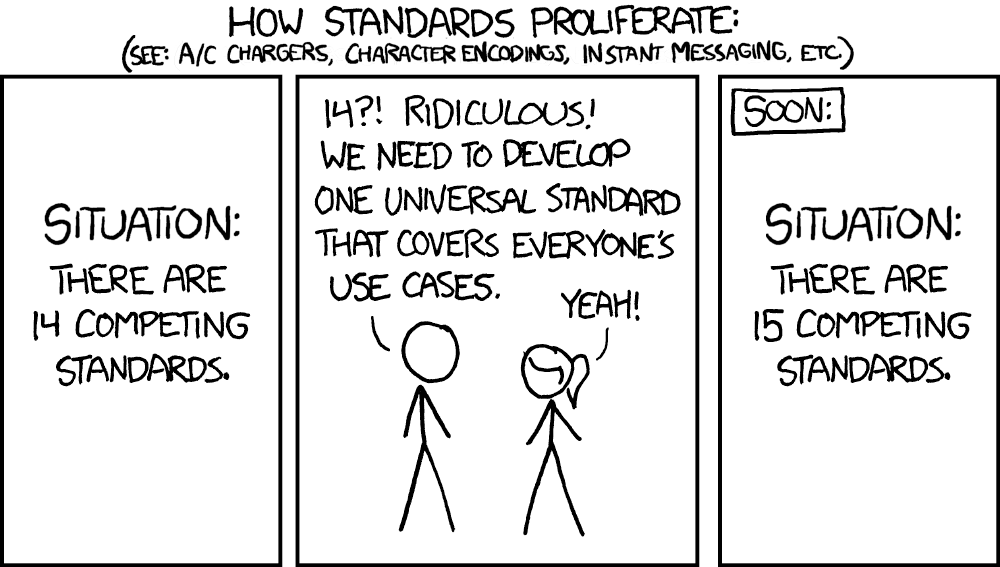
Obligatory: https://imgs.xkcd.com/comics/standards_2x.png
The main problem is having proper translation of device management features, e.g. SMART diagnostics or similar getting back to the host. But from a performance perspective, it seems reasonable to switch to USB once you are multiplexing drives over the same, limited IO channels from the CPU to expand capacity rather than bandwidth.
Once you get out of this smallest consumer expansion scenario, I think NAS takes over as the most sensible architecture for small office/home office settings.
Other SAN variants really only make sense in datacenter architectures where you are trying to optimize for very well-defined server/storage traffic patterns.
Is there any drawback to going towards USB for multiplexed storage inside a desktop PC or NAS chassis too? It feels like the days of RAID cards are over, given the desire for host-managed, software-defined storage abstractions.
Does SAS still have some benefit here?
I wonder what it would take to get the same behavior out of USB as for other "internal" interconnects, i.e. say this is attached storage and do retry/reconnect instead of deciding any ephemeral disconnect is a "removal event"...?
FWIW, I've actually got a 1 TB Samsung "pro" NVMe/M.2 drive in an external case, currently attached to a spare Ryzen-based Thinkpad via USB-C. I'm using it as an alternate boot drive to store and play Linux Steam games. It performs quite well. I'd say is qualitatively like the OEM internal NVMe drive when doing disk-intensive things, but maybe that is bottlenecked by the Linux LUKS full-disk encryption?
Also, this is essentially a docked desktop setup. There's nothing jostling the USB cable to the SSD.
USB4 is just passing PCIE traffic and should be fine, but at that point you are paying >$150 per usb4 hub (because mobos have two at most) and >$50 per m.2 converter.
Right now I am overlooking my display and seeing 4 different USB-A hubs and 3 different enclosures that I am not sure what to do with (likely can't even sell them, they'd go for like 10-20 EUR and deliveries go for 5 EUR so why bother; I'll likely just dump them at one point). _All_ of them were marketed as 24/7, not needing cooling etc. _All_ of them could not last two hours of constant hammering and it was not even a load at 100% of the bus; more like 60-70%. All began disappearing and reappearing every few minutes (I am presuming after overheating subsided).
Additionally, for my future workstation at least I want everything inside. If I get an [e]ATX motherboard and the PC case for it then it would feel like a half-solution if I then have to stack a few drives or NAS-like enclosures at the side. And yeah I don't have a huge villa. Desk space can become a problem and I don't have cabinets or closets / storerooms either.
SATA SSDs fill a very valid niche to this day: quieter and less power-hungry and smaller NAS-like machines. Sure, not mainstream, I get how giants like Samsung think, but to claim they are no longer desirable tech like many in this thread do is a bit misinformed.
Once you get to uATX and larger, this could potentially be via a PCIe adapter card too, right? For an SSD scenario, I think some multiplexer card full of NVMe M.2 slots makes more sense than trying to stick to an HDD array physical form factor. I think this would effectively be a PCIe switch?
I've used LSI MegaRAID cards in the past to add a bunch of ports to a PC. I combined this with a 5-in-3 disk subsystem in a desktop PC. This is where the old 3x 5.25" drive bay space could be occupied by one subsystem with 5x 3.5" HDD hot-swap trays. I even found out how to re-flash such a card to convert it from RAID to a basic SATA/SAS expander for JBOD service, since I wanted to use OS-based software RAID concepts instead.
Honestly no idea. Should be doable but with personal computing being attacked every year, I would not hold my breath.
> Once you get to uATX and larger, this could potentially be via a PCIe adapter card too, right?
Sure, but then you have to budget your PCIe lanes. And once you get to a certain scale (a very small one in fact) then you have to consider getting a Threadripper board + CPU, and that increases the expense anywhere from 3x to 8x.
I thought about it lately and honestly it's either a Threadripper workstation with all the huge expenses that entails, or I'd probably just settle for an ITX form factor, cram it with 2-3 huge NVMe SSDs (8TB each), have a really good GPU and quiet cooling... and just expand horizontally if I ever need anything else (and make VERY sure it has at least two USB 4 / Thunderbolt ports that don't gimp the bandwidth to your SSDs or GPU so the expansion would be at 100% capacity).
Meaning that going for a classic PC does not makes sense if you want an internally expandable workstation. What's the point in a consumer board + a Ryzen 9950X and a big normal PC case if I can't put more than two old-school HDDs in there? Just to have a better airflow? Meh. I can put 2-3 Noctua coolers in an ITX case and it might even be quieter.
I don't really know how one would get numbers for any of the above one way or the other though.
I am almost never IO blocked where the performance difference between the two matters. I guess when I do the initial full backup image of my drive, but after that, everything is incremental.
This doesn't make sense as written. I suspect you meant to say "SATA SSDs" (or just "SATA") in the first sentence instead of "SSDs", and M.2 instead of NVMe in the second sentence. This kind of discussion is much easier to have when it isn't polluted by sloppy misnaming.
Even then, I suppose it how the m.2 vs 2.5" SATA mounting turns out depends on the specific system. E.g. on this PC the main NVMe slot is above the GPU but mounting a 2.5" SSD is 4 screws on a custom sled + cabling once mounted. If it were the other way around and the NVMe was screw-in only below the GPU while the SSD had an easy mount then it might be a different story.
We've already seen the typical number of SATA ports on a consumer desktop motherboard drop from six to four or two. We'll probably go through a period where zero is common but four is still an option on some motherboards with the same silicon, before SATA gets removed from the silicon.
I want to build a mini PC-based 3D printed NAS box with a SATA backplate with that exact NVME connector adapter setup!
https://makerworld.com/en/models/1644686-n5-mini-a-3d-printe...
The reality is, as long as you have PCIe you can do pretty much whatever you want, and it's not a big deal.
It's called a PCIe disk controller and you just accustomized to have one built-in in the south bridge.
https://wccftech.com/no-samsung-isnt-phasing-out-of-the-cons...
SATA SSD still seems like the way you have to go for a 5 to 8 drive system (boot disk + 4+ raid6).
DWPD: Between the random teamgroup drives in the main NAS and WD Red Pro HDDs in the backup, the write limits are actually about the same. With the bonus reads are infinite on the SSDs, so things like scheduled ZFS scrubs don't count as 100 TB of usage across the pool each time.
Heat: Actually easier to manage than the HDDs. The drives are smaller (so denser for the same wattage) but the peak wattage is lower than the idle spinning wattage of the HDDs and there isn't a large physical buffer between the hot parts and the airflow. My normal case airflow keeps them at <60C under sustained benching of all of the drives raw, and more like <40 C given ZFS doesn't like to go more than 8 GB/s in this setup anyways. If you select $600 top end SSDs with high wattage controllers shipping with heatsinks you might have more of a problem, otherwise it's like 100 W max for the 22 drives and easy enough to cool.
PLP: More problematic if this is part of your use case, as NVMe drives with PLP will typically lead you straight into enterprise pricing. Personally my use case is more "on demand large file access" with extremely low churn data regularly backed up for the long term and I'm not at a loss if I have an issue and need to roll back to yesterday's data, but others who use things more as an active drive may have different considerations.
The biggest downsides I ran across were:
- Loading up all of the lanes on a modern consumer board works in theory, can be buggy as hell in practice. Anything from the boot becoming EXTREMELY long to just not working at all sometimes to PCIe errors during operation. Used Epyc in a normal PC case is the way to go instead.
- It costs more, obviously
- Not using a chassis designed for massive numbers of drives with hot-swap access can be quite the pain to troubleshoot install for.
The biggest upsides (other than the obvious ones) I ran across were:
- No spinup drain on the PSU
- No need to worry about drive powersaving/idling <- pairs with -> whole solution is quiet enough to sit in my living room without hearing drive whine.
- I don't look like a struggling fool trying to move a full chassis around :)
Its always one of the 2. M.2 but PCIe/NVMe, or SATA but not M.2.
Used multiport SATA HBA cards are inexpensive on eBay. Multiport nvme cards are either passive for bifurcation and give you 4x x4 for an x16 slot or are active and very expensive.
I don't see how you get to 16 m.2 devices on a consumer socket without lots of expense.
In practice you can put 4 drives in the x16 slot intended for a GPU, 1 drive each in any remaining PCIe slots, plus whatever is available onboard. 8 should be doable, but I doubt you can go beyond 12.
I know there are some $2000 PCIe cards with onboard switches so you can stick 8 NVMe drives on there - even with an x1 upstream connection - but at that point you're better off going for a Threadripper board.
Even that gives you one m.2 slot, and 8/8/8/16 on the x16 slots, if you have the right cpu. Assuming those are can all bifurcate down to x4 (which is most common), that gets you 10 m.2 slots out of the 40 lanes. That's more than you'd get on a modern desktop board, but it's not 16 either.
For home use, you're in a tricky spot; can't get it in one box, so horizontal scaling seems like a good avenue. But in order to do horizontal scaling, you probably need high speed networking, and if you take lanes for that, you don't have many lanes left for storage. Anyway, I don't think there's much simple software to scale out storage over multiple nodes; there's stuff out there, but it's not simple and it's not really targeted towards a small node count. But, if you don't really need high speed, a big array of spinning disks is still approachable.
Buiding a new system with that in 2025 would be a bit silly.
Tech news has been quite the bummer in the last few months. I'm running out of things to anticipate in my nerd hobby.
It's the end of an era.
If you care even remotely about speed, you'll get an NVMe drive. If you're a data hoarder who wants to connect 50 drives, you'll go for spinning rust. Enterprise will go for U.3.
So what's left? An upgrade for grandma's 15-year-old desktop? A borderline-scammy pre-built machine where the listed spec is "1TB SSD" and they used the absolute cheapest drive they can find? Maybe a boot drive for some VM host?
There's probably a similar cost usb-c solution these days, and I use a usb adapter if I'm not at my desktop, but in general I like the format.
I would think an SSD is going to be better than a spinning disc even with the limits of sata if you want to archive things or work with larger data or whatever
4 M.2 NVMe drives is quite doable, and you can put 8TB drives in each. There are very few people who need more than 32TB of fast data access, who aren't going to invest in enterprise hardware instead.
Pre-hype, for bulk storage SSDs are around $70/TB, whereas spinning drives are around $17/TB. Are you really willing to pay that much more for slightly higher speeds on that once-per-month access to archived data?
In reality you're probably going to end up with a 4TB NVMe drive or two for working data, and a bunch of 20TB+ spinning drives for your data archive.
I have a couple of 2TB USB-C SSDs. I haven't bought a separate SATA drive in well over a decade. My last home built PC broke around 2013.
(SSDs are "fine", just playing devil's advocate.)
Actually that's a really common use - I've bought a half dozen or so Dell rack mount servers in the last 5 years or so, and work with folks who buy orders of magnitude more, and we all spec RAID0 SATA boot drives. If SATA goes away, I think you'll find low-capacity SAS drives filling that niche.
I highly doubt you'll find M.2 drives filling that niche, either. 2.5" drives can be replaced without opening the machine, too, which is a major win - every time you pull the machine out on its rails and pop the top is another opportunity for cables to come out or other things to go wrong.
And even in worst-case hammering of drives, thermally throttled NVMEs can still sustain higher speeds than SATA drives.
And most consumer NVMe SSDs don't need any extra cooling for normal use cases, because consumer workloads only generate bursts of high-speed IO and don't sustain high power draw long enough for cooling to be a serious concern.
In the datacenter space where it is actually reasonable to expect drives to be busy around the clock, nobody's been trying to get away with passive cooling even for SATA SSDs.